
Bitrek CONNECT EX03 Expansion Module
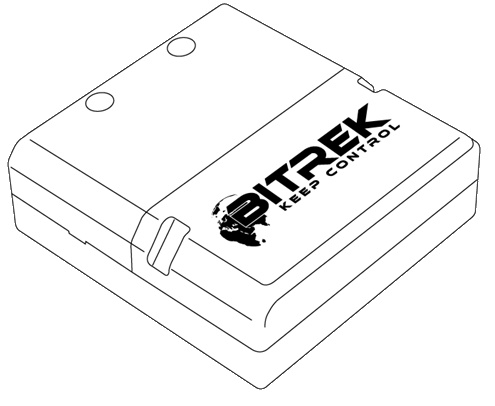
Device Purpose
The EX03 module of Bitrek Connect is designed to work with various external sensors that have analog and discrete outputs. The data received from the sensors are processed and translated by the module to the Connect-Bus.
Scope of delivery
The EX03 module of the Bitrek Connect system comes in the following package:
- EX03 module - 1 pc;
- Data sheet - 1 pc;
- Warranty card - 1 pc;
- Packing Box - 1 pc;
- Micro Fit 4-pin cable - 1pc;
- Micro Fit 16-pin cable - 1pc;
- Rubber gasket - 3pc.
Technical specifications of the device
Technical characteristics of the device are presented in the table.
Table 1: Technical specifications of the device
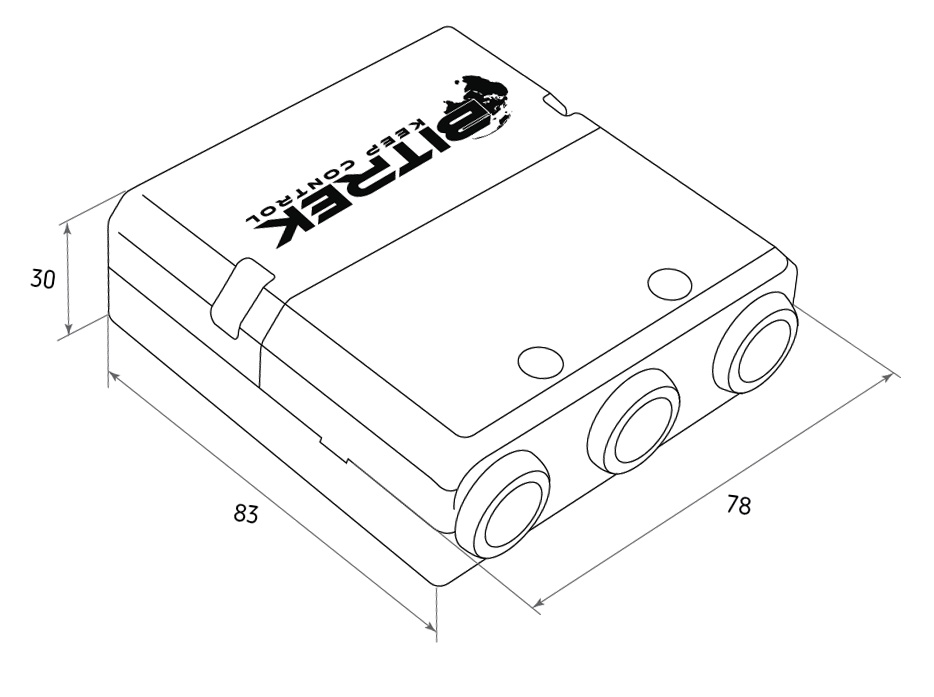
Appearance and dimensions of the device
Pin assignment
The EX03 module has three Micro-Fit connectors. These are two 4-pin connectors for connecting the Connect-Bus, and one 16-pin connector for connecting external sensors.
The four-pin connectors (Fig. 2) are Connect-Bus connectors, which have power outputs of the module and outputs of the bus signal lines.
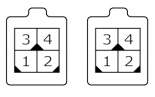
Fig.2. Connect-Bus connectors #1 and #2
The pinout of the Connect-Bus connectors is shown in Table 2.
Table 2 The pin-out of the Connect-Bus connectors No.1 and No.2
The 16-pin connector (Fig.3) is the connector for external sensors.
Fig.3. Connector for connecting external sensors.
The connector for external sensors connection is shown in table 3.
Table 3: Connector pin-out for external sensors
Description of indication organs
On the front panel of the module on the connectors side there is one red LED, designed for indication of the connection status of the module to the Connect-Bus. If the connection is active, the LED is lit.
Description of module operation
The EX03 module of the Bitrek Connect system has three analog inputs and eight digital inputs. The digital inputs are divided into two groups: d_High, which become active when "+" power is applied, and d_Low, which becomes active when "-" power is applied.
In turn, each group of digital inputs has 2 high-frequency inputs, capable of processing the incoming signal frequency up to 10 kHz and 2 standard inputs, capable of processing the incoming signal frequency up to 20 Hz.
Description of the inputs is given in Table 3 of this manual.
The analog inputs are able to measure the voltage applied to them and transfer it to the Connect-Bus.
Discrete inputs process the signals connected to them and give the following information to the Connect-Bus:
-
the current state of the input. Displays the current state of the input - active (1) or inactive (0). This type of information can be used to control the ignition signal, alarm buttons, various limit switches, etc.
-
-Trigger input. Trigger has two stable states - on and off.
-
-frequency input. Displays the frequency value of the signal connected to the input. It can be used to control the engine speed, or to connect the frequency remote control.
-
- accumulation counter. Displays information about the number of pulses applied to the input. This counter is accumulative with the function of saving values to the module's non-volatile memory. Saving of counter values is performed once per second. Can be used for connection of pulse fuel flow meters.
Setting up the EX03 module
The EX03 module has a number of configurable parameters, the list of which is presented in Appendix 1.
The module is configured using the Bitrek Connect configurator module and Connect Configurator software. How to work with the configurator module and the software is described in detail in the document "General guide to organizing and configuring the Bitrek Connect system".
The main settings of the module:
-
Type of used filter for ADC signal post processing (parameter 0400). The selected value of this parameter will determine the type of ADC filter to be used. the selected value of this parameter will determine the type of ADC filter to be used (absolute value, The selected value of this parameter determines the type of used ADC filter (absolute value, average value, median filtering).
-
The switching timeout of the digital inputs (parameter 0401). On . the value of this parameter determines the minimum length of the incoming pulse, which this input can pass.
Module operation in the mode of concrete drum counter
The EX03 module of Bitrek Connect can operate as concrete mixer drum speed counter mode. In this mode, the module is able to determine the drum's movement status, direction of movement (fixation of mixing and dumping modes), as well as the total number of revolutions made by the drum.
To operate in this mode, you must connect to the module two sensors for the position of the drum of the concrete mixer. These can be inductive sensors. The main electrical requirement for the sensors is
- Two stable states - a logical zero and a logical one on the output.
The sensors are placed at a certain distance from each other. If the barrel rotates in one direction, the first sensor will be triggered at the beginning of the movement. the first sensor is triggered, then the second one. In the opposite direction respectively first the second sensor, then the first. This the direction of the barrel movement is determined by this principle. The speed of the barrel movement is determined by the amount of time between between the two sensors.
The sensors are connected to the following inputs:
Table 4: Connection of concrete truck drum speed sensors
Appendix 1 . Device parameters
Addendum 2. List of variables broadcast to Connect-Bus
- Variable automatically determines the condition of the mixer drum:
0 - indeterminate state
1 - one way movement
2 - movement in the opposite direction