
How to Add and Configure Internal Sensors
To add an internal sensor, you need to click Add button in the Sensors section, then in the sensor type field you need to select Internal sensor type. If you want, you can choose the number of the sensor and its name, otherwise the name will be set automatically.
Next, you need to select an internal sensor subtype: More information about internal sensor subtypes and their functions in the table below:
For each of the selected subtypes you also configure the event that will trigger the sensor more about event configuration in the table below:
Event generation by range entry
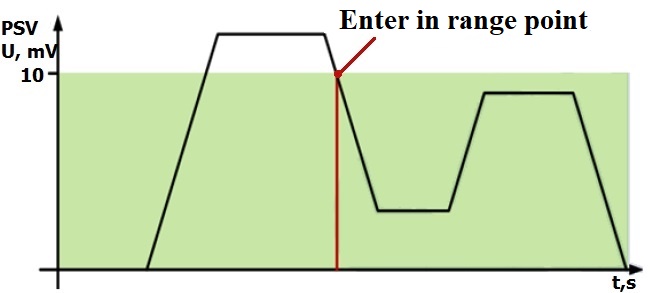
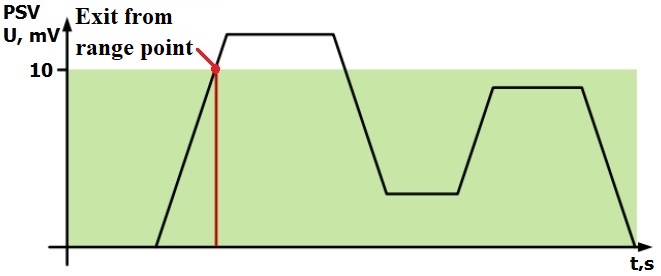
Generating an event on leaving the range
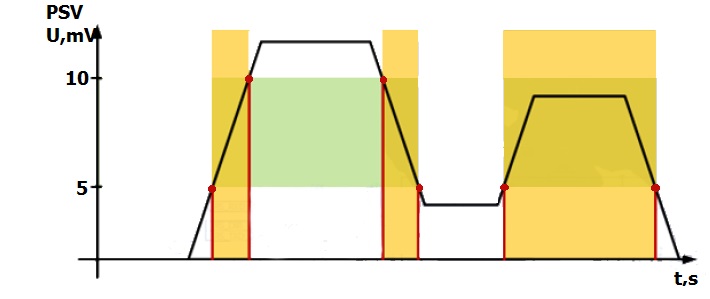
Range entry/exit event generation
Once you have successfully configured the way the event is generated, you need to start selecting the content type, more details about the content types in the table below: