
Connecting GPS Trackers

In this section of the configuration site, you can enable a software tracker that allows:

  • monitor the position of the mNVR and send data to the server via IPS;
  • send photos to the server via IPS;
  • send links to photos and videos linked to IPS coordinates.

Tracker setting

Picture 1 – Tracker settings
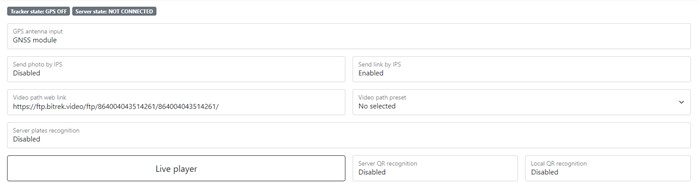
Table 1 — Tracker settings parameters description

Parameter Parameters description
GPS antenna input The type of tracker location, with the help of GPS antenna or static coordinates
GNSS module Global navigation system module
Static coordinates Specified coordinates - for use without GPS antennas
Send photo by IPS Sending a photo via IPS
Send link by IPS Sending a link via IPS
Video path web link Video web link
Video path preset Presets of the link on which type of storage will be copied: FTP or cloud
Server plates recognition Car plates recognition using API Bitrek
Server QR recognition QR codes recognition using API Bitrek
Local QR recognition QR codes recognition using mNVR
Live player Link on the live stream

Point creation and accelerometer sensitivity settings

Figure 2 — Point creation and accelerometer sensitivity settings
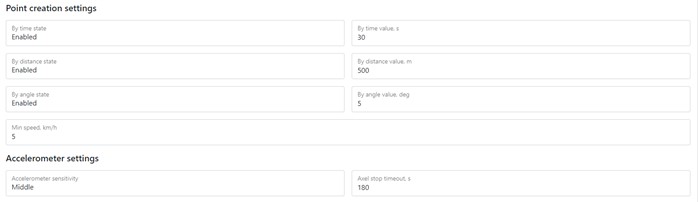
Table 2 — Point creation and accelerometer sensitivity settings parameters description

Parameter Parameters description
Time The value of the creation interval points by time
Distance The value of the creation interval points on distance
Angle The value of the creation interval points on angle
Min. speed Max waiting time while continue connect on server, in case of exceeding timeout value, will be reconnection attempt on backup server
Accelerometer sensitivity Sensitivity of mounted into device accelerometer
Auto stop timeout If the device is not moving a set timeout, setting STOP value

IPS servers settings

Picture 3 – IPS servers settings
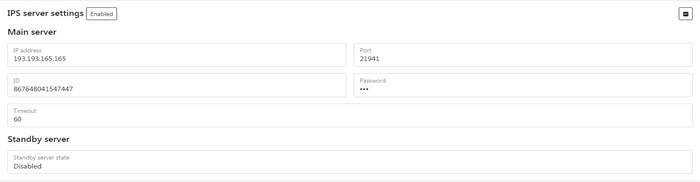
*Table 3 — IPS servers settings parameters description *

Parameter Parameter description
IP address IP address of the master server
Port Port of the master server
ID ID of the device of the master server
Password device password on the main servers
Timeout Timeout - no connection to server. When Timeout is exceeded will reconnect to Standby server
Standby server state State of the standby server on/off

Info

Picture 4 – Info

Table 4 — Info parameters description

Parameter Parameter description
LAT Latitude
LON Longitude
MOVE Movement
SPEED Speed of the tracker
ANGLE GPS angle
DATA GPS data
TIME GPS time
HDOP Horizontal dilution of precision
SATS Satellite data
ALT Altitude of the tracker

To set the default settings, click the Default button. To save settings in NVR click Save settings button.
