
Wi-Fi Connection Settings
You can use a Wi-Fi connection to configure the device. By default, each device creates a closed access point. Access point access parameters (specified in the AP configuration)
SSID: VM03_IMEI of device Password: DVR + Last 3 digits + 4th and 5th one of IMEI for example: IMEI 353464071592365 SSID: VM03_353464071592365 password: DVR36546
Wi-Fi and AP configuration
Figure 1 — Wi-Fi and AP configuration

Table 1 — Wi-Fi configuration parameter description
Client configuration
The device can transmit data to the server using a Wi-Fi network in connection mode to the access point. If you have a Wi-Fi connection, the default gateway will be switched from GSM to Wi-Fi, and all information will go via Wi-Fi. When you disconnect the Wi-Fi access point, you will be reconnected to GSM. ATTENTION! The connection to the access point should be set up after making sure that the signal level of the point is good. You can check the signal level on the Wi-Fi networks monitor tab. SIGNAL QUALITY of the required network must be at least 20%. If the network is spaced, or its level is below 20%, the module will switch to AR mode
Figure 2 — Client configuration
Table 2 — Client configuration parameter description
Figure 3 — Wifi information
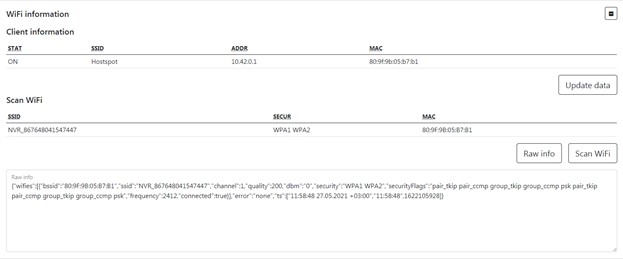
*Table 3 — Wifi information parameter description *
To set the default settings, click the Default button. To save settings in NVR click Save settings button.